From Angular to Astro: building a cheap (and fast) personal site with a blog
I rewrote my website from Angular to Astro to have a Markdown blog with no backend, keep hosting costs low and chase the four green Lighthouse scores.
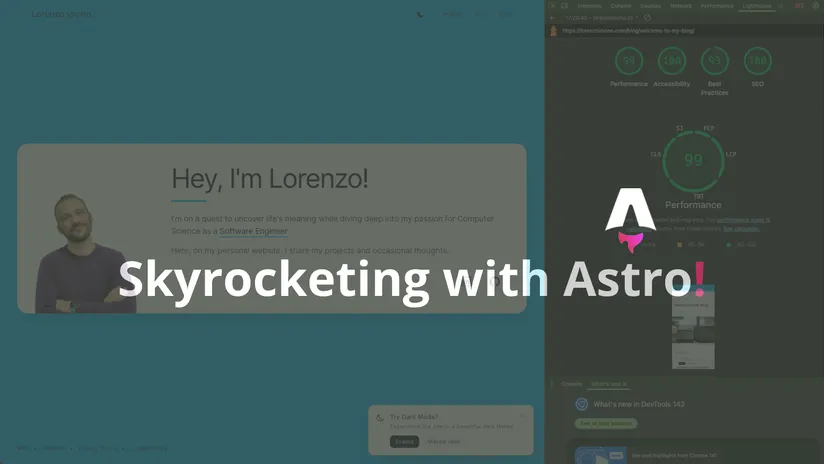
Table of Contents
I like technical challenges.
I know Angular very well and I used React a lot too. So at some point I wanted to try something different and people kept telling me: “look at Astro”.
The main goal was simple:
- I wanted a blog
- I didn’t want to build or maintain a backend just to publish posts
- I wanted the site to be cheap to run (and, if possible, a bit more green)
So… I rewrote my site. Angular SPA → Astro static site.
Why Astro (for me)
For a personal website, most pages are content. Not “app”. And for content, static generation is just great:
- fast pages
- easy deployment
- no server to keep alive
- Markdown files for posts (simple workflow)
Astro also gives you a nice middle ground: you can keep the site mostly static, but still add interactivity when you really need it.
The honest part: I used AI for most of the migration
I’m going to be super honest: I used an AI agent to do a big part of the work.
I read the Astro docs (just enough), then I basically jumped into development using AI, staying quite “high level”. I was more like a product owner: I described what I wanted, then I reviewed what the AI generated and I fixed the parts where it got lost.
This workflow was fast, but it has a cost: you can lose details if you don’t stop and write things down.
Still, it was the right choice for this kind of project. I wanted results, not became expert in Astro, but, in the same time i don’t want to lose the good part of development and the curiosity to know what’s Astro can offer to me.
Where the AI got lost (and where I had to step in)
Most problems were not on the backend side (there is no backend 😄). The real issues were UI and visual details:
- moving layouts from Angular to Astro: spacing and alignment were often “almost right”, but not correct
- animations: I have small fishes in the footer… that kind of thing is annoying to replicate if you don’t see the final result
- dark mode: the AI can add a toggle, but it doesn’t really “see” what is still wrong (colors, contrast, icons visibility, etc.)
So the pattern was always the same:
- AI does 80%
- I test and compare
- I fix the last 20% manually
That last 20% is where you spend most of the time, really… this 20% cost me really a lot of LLM tokens.
Content was the hardest part
The biggest pain wasn’t the framework. It was content.
I had to rewrite pages and sections into Markdown / MDX, then make sure Astro renders them correctly (Astro has its own way and content collections are powerful but different if you come from Angular).
In the end it’s worth it: now writing a post is literally creating a .md file and pushing it.
Hosting: keep it simple, keep it cheap
For this site I didn’t want any “platform magic” that becomes expensive with time.
A static site can be hosted in a very boring way (and that’s a compliment):
- build
- upload to S3
- serve with CloudFront
- invalidate cache when needed
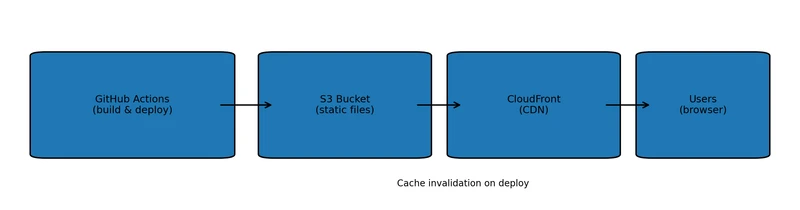 My hosting setup: GitHub Actions → S3 → CloudFront
No servers, no backend, no database.
And if the site is light, you also reduce bandwidth and compute. Not saving the planet alone, but at least I’m not wasting resources for a personal site.
Costs (AWS): basically cents, unless you get real traffic
One reason I went with a static setup (S3 + CloudFront) is cost predictability.
For a personal site, storage on S3 is usually negligible (we’re talking cents/month for a few hundred MB). CloudFront also has a generous “always free” tier (1 TB data transfer out + 10M HTTP(S) requests per month), which is more than enough for a normal personal blog.
The only “fixed” recurring cost I really consider is DNS: Route 53 hosted zone is $0.50/month (plus the domain). And cache invalidations are free for the first 1,000 paths/month, so regular deploys don’t cost anything.
Performance and the “four green gauges” obsession
At some point I started chasing Lighthouse scores like a videogame.
 Lighthouse scores for lorenzoiovino.com
Accessibility was the most fun one. Lighthouse kept telling me: bad contrast. So I had to choose better colors, especially for text and dark mode. It’s a small thing, but it makes the site nicer to read. And it’s also just… the right thing to do.
Then there was performance, especially around:
- CLS (layout shift)
- render-blocking stuff
- images
Fixing CLS and render-blocking (fonts + LCP image)
Two things that helped a lot:
- make Google Fonts non-blocking (
font-display: swap) and avoid FOIT - give priority to the hero image (LCP) and don’t lazy load above-the-fold content
This kind of change is boring, but the result is visible (and Lighthouse stops yelling).
Image optimization: the “Astro saved me” moment
In the old site, images were not optimized. Some were huge. My first thought was: “ok, I know this… I can build an AWS Lambda that resizes and optimizes images on the fly, then put CloudFront in front”.
I did similar things at work.
But… for my personal site it was too much. More moving parts, more cost, more complexity.
Then I discovered something very nice: Astro can optimize images at build time (Astro Assets).
So I moved images into the project assets, used the <Image /> component and let the build do the job.
Result: smaller images, automatic formats (like WebP), no extra infrastructure.
That was a big win: less complexity, better performance, cheaper hosting.
SEO checks: not only Lighthouse
Lighthouse is great, but I also used tools like Screaming Frog to see issues in a more “SEO crawler” way (missing meta, duplicated titles, broken stuff, etc.).
It’s a different view of the site and sometimes it highlights problems you don’t notice when you just browse your own pages.
What I learned (and what I would do again)
- Astro is a great fit for content sites
- static hosting is boring and boring is good
- AI can speed up the migration a lot, but you still need to review and fix the last details
- performance work is not “one big thing”, it’s a lot of small fixes
- accessibility is not optional -> it makes your site better
If you are thinking about moving your personal site to Astro: do it, “be quick or be dead”. 🤘
Worst case you learn something new. Best case you end up with a faster site and a blog you actually use.
And now… the real challenge is writing posts consistently. 😅